
Cash Deposits
This page is the official SOP for depositing shift settlement cash at the bank. Deposits are recorded by outlet managers in the Butter Manager app in two steps: prepare the deposit before you leave for the bank, and record the slip right after the deposit is completed.
Effective August 28th, 2026, this process replaces all previous cash deposit procedures. It must be followed exactly, with no variation, for every cash deposit at every outlet.
How It Works
Every closed POS shift that collected cash becomes one cash envelope for that outlet. The Manager app shows every envelope that has not been deposited yet, and a deposit is simply a group of envelopes taken to the bank as one bank deposit slip:
- Prepare — In the app, select the envelopes you are taking to the bank. The app reserves them for you and gives you a deposit reference (for example
DEPOSIT-29). - Deposit at the bank — Deposit the exact total shown in the app, and type the deposit reference into the slip's "berita" (remarks) field.
- Record the slip — Back in the app, confirm the reference, enter the amount and date from the slip, and upload a photo of the slip.
Once recorded, the deposit is matched against the bank statement automatically by the finance system. There is nothing else you need to send or report.
Before You Start
The Deposits screen lives in the Admin section of the Butter Manager app, which is only available when you are logged in with your own Butter account (email and password).
- Install the Manager app on your own phone. Do not log in with your own email on the outlet's shared phone — the outlet device stays logged in with its device code.
- Android: download the latest version here: app.butterpos.co/download/outlet-manager/apk
- iOS: contact company management to receive a TestFlight invite.
If you log in and don't see the Admin option or the Deposits tab, your account is missing the cash deposit permission — contact company management.
Preparing a Deposit
Prepare the deposit before you leave for the bank, while you have the cash envelopes in front of you.
Step 1: Open the Admin section
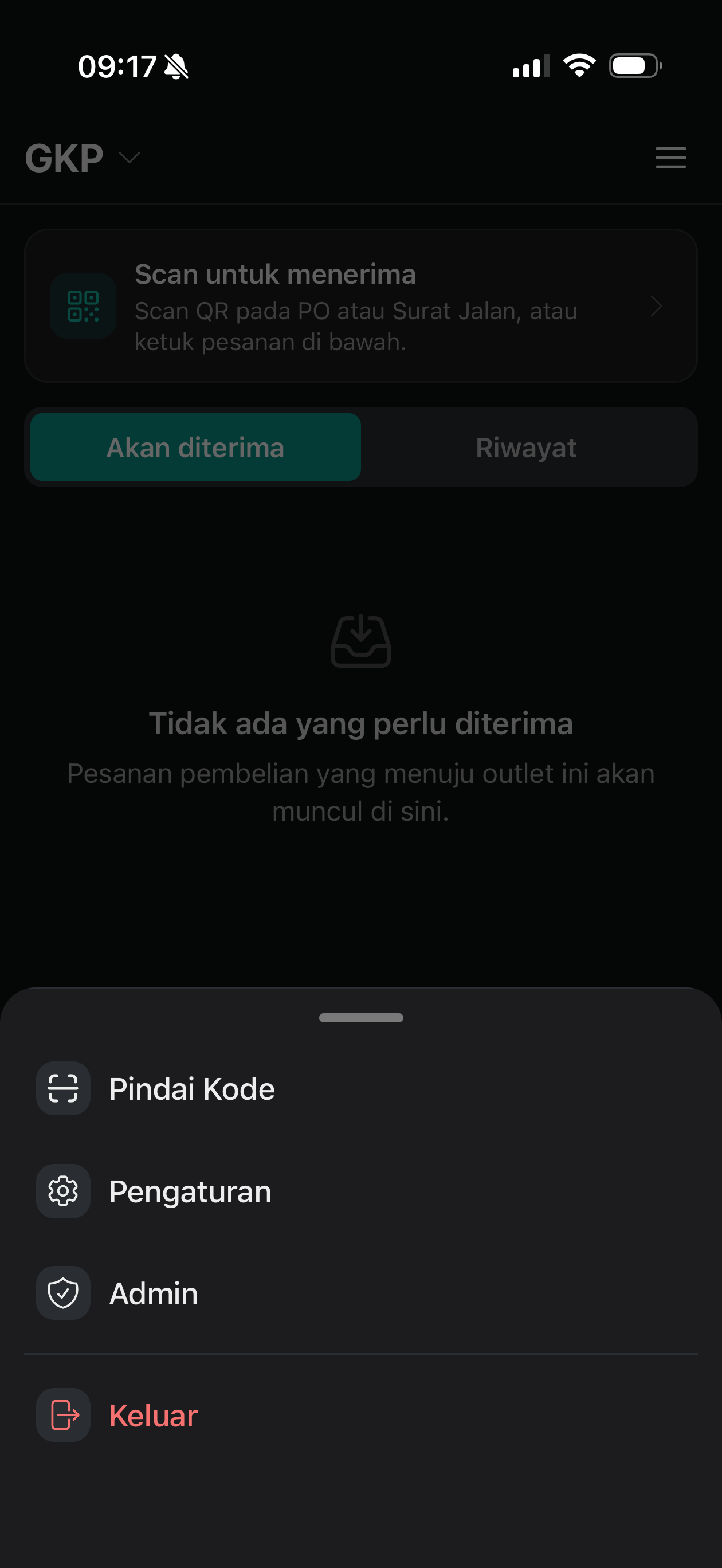
Open the Butter Manager app on your own phone, open the menu, and tap Admin.
Step 2: Open Deposits
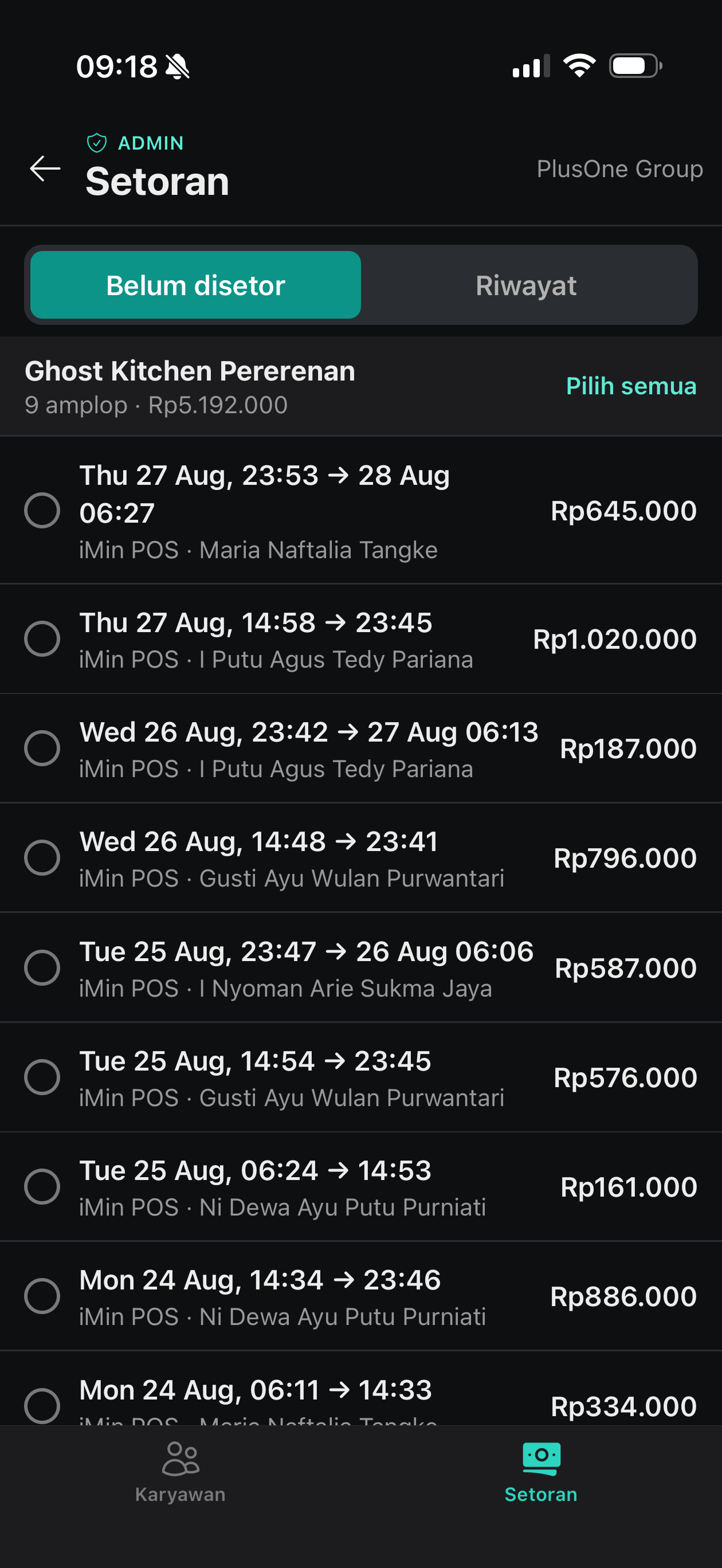
Tap Deposits (Setoran) in the navigation at the bottom of the Admin section. The "To deposit" (Belum disetor) tab lists every outstanding cash envelope across all of your outlets, grouped by outlet — one envelope per closed shift, with the shift's dates, cashier, and cash amount.
Step 3: Select the envelopes you are depositing
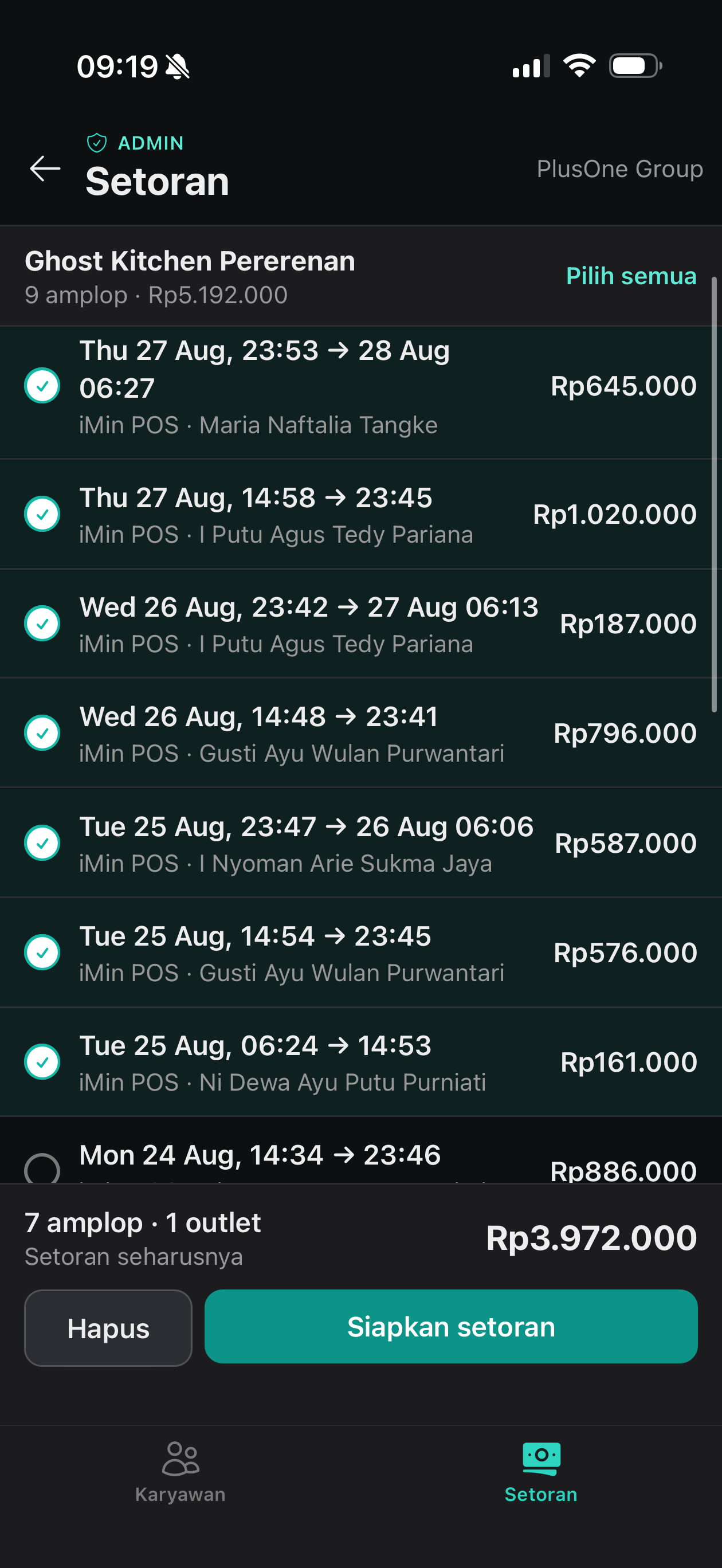
Tick each envelope you are taking to the bank today. Use "Select all" (Pilih semua) to take everything for an outlet. The bar at the bottom shows the running total that must match the cash in your bag.
You may combine envelopes from multiple outlets into one deposit. If you manage several outlets, select all the envelopes you will deposit today and bank them as a single deposit — one slip, one total.
Step 4: Verify the cash and confirm
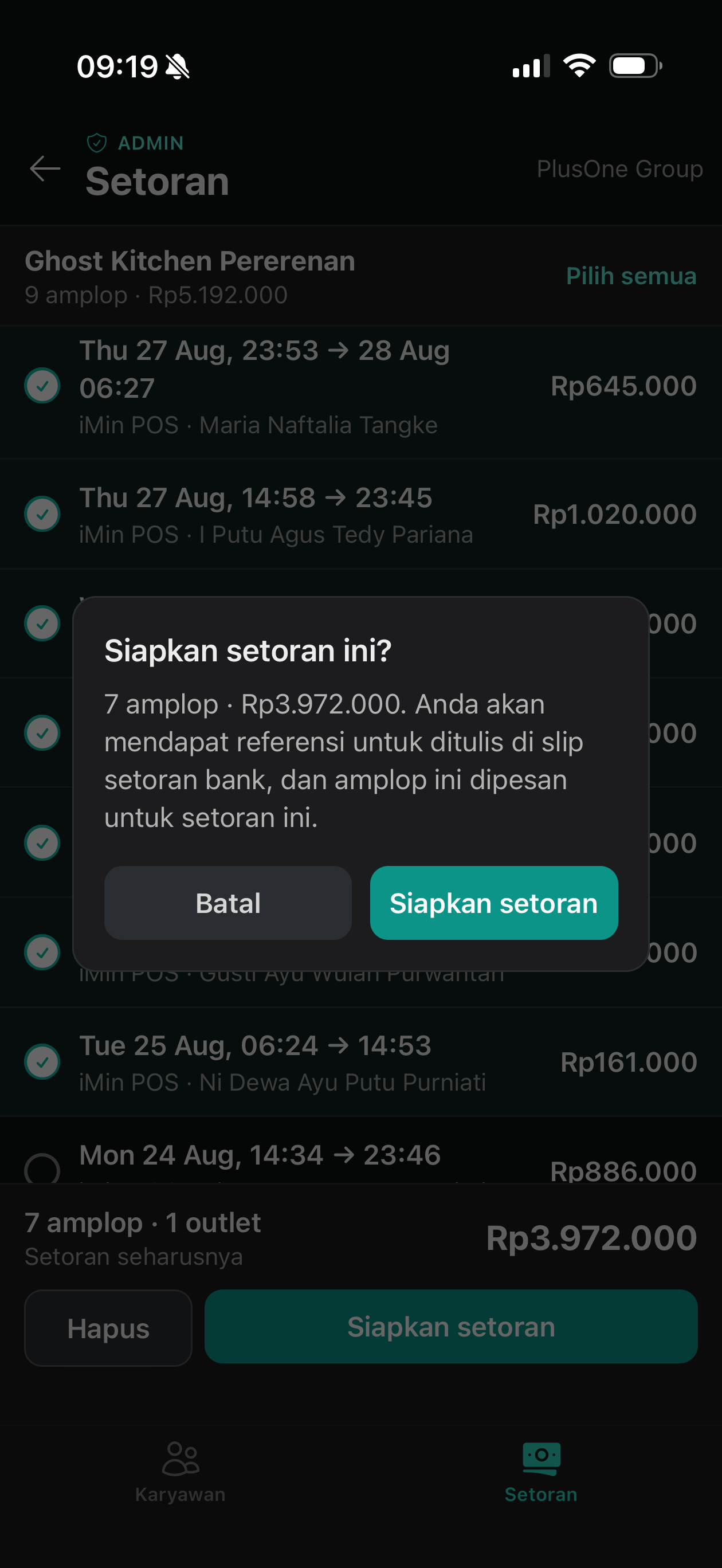
Before confirming, physically count the cash and check it matches the total shown on screen. If the difference is more than Rp 20.000, stop and report it to management immediately — do not deposit yet.
When the amounts match, tap "Prepare deposit" (Siapkan setoran) and confirm. The selected envelopes are now reserved for this deposit, so nobody else can accidentally include them in another deposit.
At the Bank
After preparing, the app shows the deposit's detail screen with two things the bank needs:
- The deposit reference (for example
DEPOSIT-29). When making the deposit — at the teller or in the BCA app — type this reference into the slip's "berita" (remarks) field, exactly as shown on screen. This is how the finance team matches your deposit on the bank statement. - The exact amount. Deposit exactly the total shown — no rounding, nothing added, nothing held back.
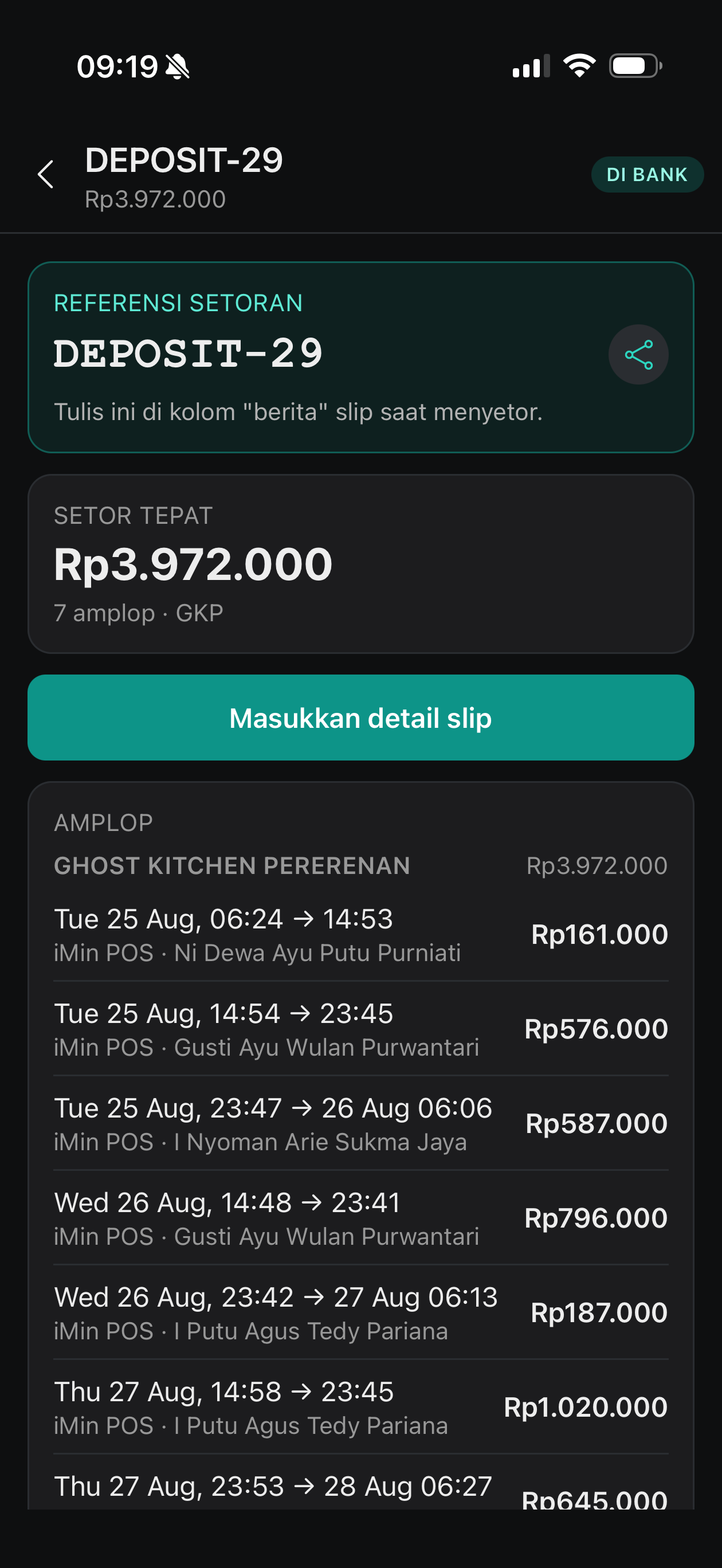
A prepared deposit that never makes it to the bank should be cancelled in the app. Cancelling releases the envelopes so they can be included in a future deposit.
Recording the Deposit Slip
As soon as the deposit is done, open the deposit in the app and tap "Enter slip details" (Masukkan detail slip):
- Confirm the reference — tap "Matches the slip" (Sesuai dengan slip) to confirm the slip shows the reference exactly.
- Enter the actual amount from the slip.
- Confirm the deposit date — the date the money actually went into the bank.
- Upload a photo of the deposit slip — at least 1 photo is required, up to 3.
- Tap "Record deposit" (Catat setoran).
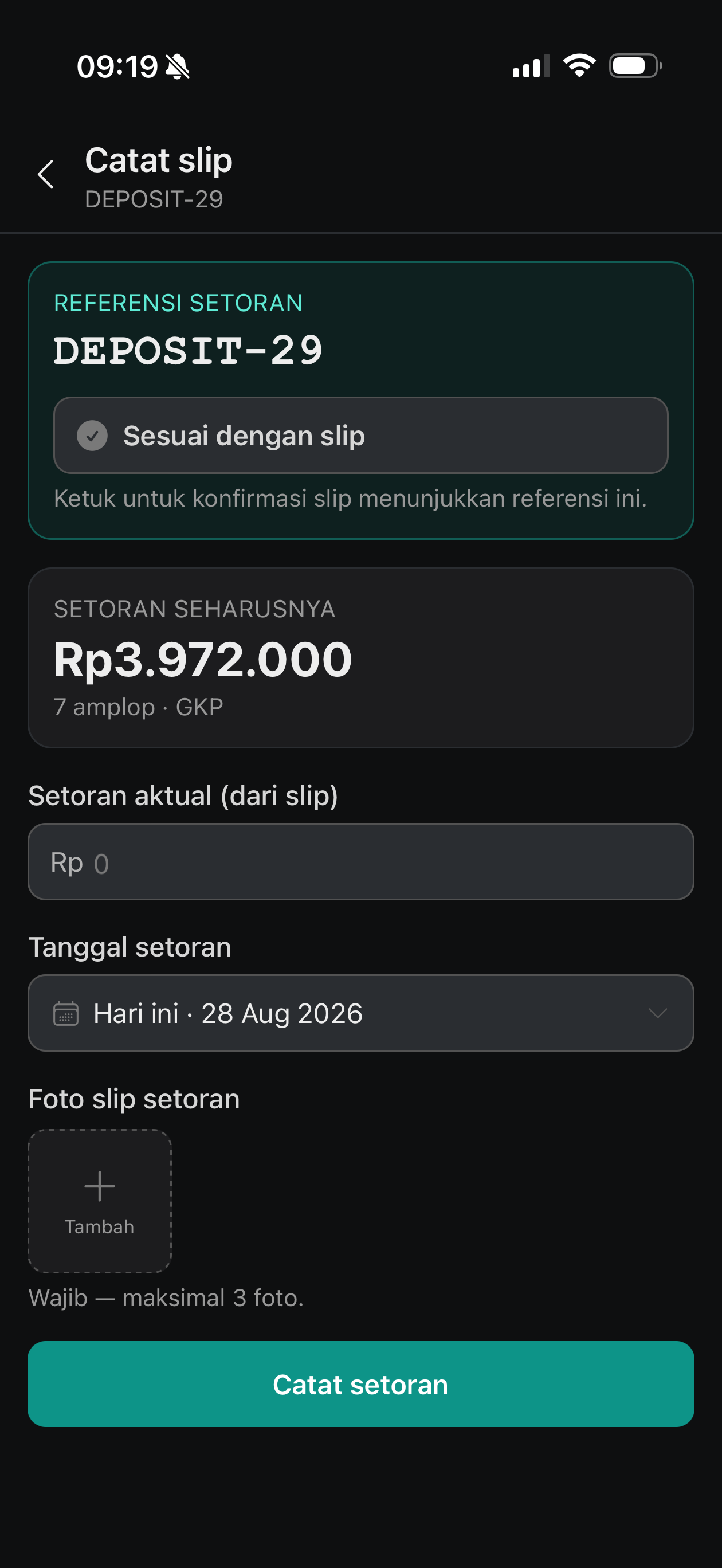
Once recorded, the deposit is complete. The finance system takes it from here — sales invoices are settled and the deposit is reconciled against the bank statement automatically.
Handling Discrepancies
| Situation | What to do |
|---|---|
| Counted cash differs from the app total by more than Rp 20.000 | Report to management immediately, before depositing. |
| Counted cash differs by a small amount | Deposit what you actually have, and enter the actual amount from the slip when recording. |
| Slip amount differs from the expected amount | The app requires a short reason for the difference. |
Small differences are booked automatically. Larger differences put the deposit on hold for management approval — the envelopes stay reserved and nothing is finalized until it is reviewed. Enter an honest, specific reason so the review is quick.
A recorded deposit cannot be edited. If something was recorded incorrectly, report it to management.
Important Rules
- This SOP replaces all prior cash deposit procedures. Follow the steps above exactly, with no variation.
- No more WhatsApp photos. You no longer need to post the deposit slip photo in WhatsApp. The photo uploaded in the Manager app is the only notification required — the app is the single source of truth.
- Always prepare before you go to the bank, and always record the slip right after the deposit — never days later.
- Deposit the exact amount, with the exact reference. The reference in the slip's berita field must match the app character for character.